How Long Does It Take to Animate a Logo? Both Routes, Timed
Animating a logo in After Effects takes most people somewhere between two and twenty hours, depending on how custom the animation is and how well they know the software. With an AI logo animation tool it takes about two minutes — for a different job: one designs an animation, the other applies a style that already exists. Both numbers below are sourced, and one of them is measured.
Upload the logo file you already have and get a finished animation back in about two minutes — no timeline, no keyframes, nothing to learn. MorphLogo animates your existing logo and lands the final frame back on your original mark. Try the logo animation AI free →
One free generation, no credit card required.
Nobody answers this question with a number. Search it and you land on five forum threads where people are asking each other, three YouTube tutorials, and two long guides that walk you through every step of the After Effects build without once putting a number on it. So here are both clocks, with the method for each spelled out.
The two routes are not doing the same job
Before any numbers, the comparison has to be fair, because these are two different tasks that happen to produce a similar-looking file.
- After Effects is where someone designs an animation: decides how the mark enters, builds the shapes, sets the keyframes and the easing, and iterates with a client. The output is exactly what was imagined, and the hours go into the deciding.
- An AI logo animation tool applies a motion style that already exists to the logo you upload. You choose from a set; you do not invent one. The minutes go into rendering, not deciding.
So the honest framing is not "twenty hours versus two minutes for the same thing":
| After Effects | An AI logo animation tool | |
|---|---|---|
| What you are buying | An animation designed for this logo | An existing motion style applied to this logo |
| Where the time goes | Deciding and building | Rendering |
Twenty hours buys a bespoke animation; two minutes buys one you did not design. Everything below assumes you already know which of those you want.
How long does it take to animate a logo in After Effects?
There is no published measurement of this, so the best available evidence is what working motion designers say when other designers ask them. These are self-reported times, collected from Google's own result snippets on 21 September 2026 — every one of them is somebody's recollection of their own project, not a controlled test. Each row links to where it was said.
| Reported time | Job described | Where it was said |
|---|---|---|
| About 30 minutes | One still photo animated end to end; the six-second export alone ran up to 12 minutes | r/editors, "the average time it takes you to animate a photo" |
| Within an hour | A logo animation that billed $2,000 — posted as a best-case brag | r/AfterEffects, "best-paying project?" |
| An hour or two | "Last project took an hour or two. I did a logo animation." | r/AfterEffects, "How many hours did your latest project take?" |
| About 2 hours | A 20-second finished piece, shared in a freelance editing group | Facebook, freelancing video editing group |
| 8 hours | Two minutes of finished animation | r/AfterEffects, same thread as above |
| 20 hours | "Something similar but of a dog" — "trying to get the proportions right" | r/AfterEffects, "How long would it take to animate a logo like this?" |
| 30+ hours | "Almost always", across motion graphics projects generally | Creative COW, "How much time do you spend creating motion graphics?" |
| Hours to several weeks | Motion graphics generally, scaled by complexity | LinkedIn, motion designer post |
Read the spread rather than any single row. For a logo, the floor is about an hour, and only for someone experienced doing something simple; the middle of the range is a working day; the top is a working week. The one sub-hour figure above is a photo, not a logo — nobody in these threads animates a logo in minutes.
What a tutorial runtime leaves out
The other common way people estimate this is "how long is the tutorial". That number is real but it is a floor, not an estimate. These were the three most-watched After Effects logo animation tutorials on YouTube on 21 September 2026:
| Tutorial | Channel | Views | Runtime |
|---|---|---|---|
| Pro Logo Animation, parts 1 and 2 | Jafar Fazel | 868,000 + 104,000 | 42 min 16 s |
| Animating Logos: The Quick & Easy Method | Dansky | 453,000 | 17 min 38 s |
| 10 Pro Ways To Animate Your Logo | SonduckFilm | 397,000 | 7 min 05 s, for ten techniques |
The third row is the one that misleads. Seven minutes sounds encouraging until you check the video's own published timecodes: ten separate animations chaptered from 0:12 to 6:10, running 16 seconds at the shortest and 66 at the longest. It is a menu of techniques at demonstration speed, not a build you can follow along with once and be done.
Three real costs sit outside every one of those runtimes.
Your logo has to become layered vector shapes first. Every tutorial opens with that already done. Before the first keyframe the file has to be vector (AI, EPS or SVG), split so the icon, the wordmark and the tagline sit on separate layers, set to RGB rather than CMYK, and converted with Layer → Create → Create Shapes from Vector Layer. Adobe's documentation notes that command works on one selected layer at a time: import a multi-layer Illustrator file as a composition and you cannot convert them all in one pass — the documented way around it is to import the same file as footage and convert that single layer instead. If your logo is a PNG, none of this has started; it begins with redrawing the mark.
Some builds need parts you have to go and fetch. The fourth-most-watched tutorial in the same search (FLIMLION VisualFX, 338,000 views) is built on a third-party plugin plus a particle footage file, both downloaded separately. Another popular one keeps its project file behind Patreon.
You are following, not deciding. The most-watched tutorial ships a project file to follow along with, and its author notes in the description that the lettering was custom-designed rather than set in a font. Watching a motion designer animate their prepared logo is a different task from animating yours, and the second one is always slower.
How long does it take to learn After Effects first?
If you do not already use it, this is the number that actually decides things, and it dwarfs the animation itself.
- Basics: about two weeks. The top Quora answer on learning animation in After Effects puts it at roughly two weeks for someone who already edits video: "I figured out how to do basic animation in about two weeks."
- Competence: 80 to 150 hours. A working editor in r/editors estimates reaching a genuinely skilled level in After Effects "from zero in around 80-150 hours of training and hands on experience."
That is the part no tutorial thumbnail advertises. For a designer who will animate every week it is an investment that pays back. For a small business owner who needs one logo to move at the top of one video, it is the whole cost of the project.
How long does an AI logo animation take?
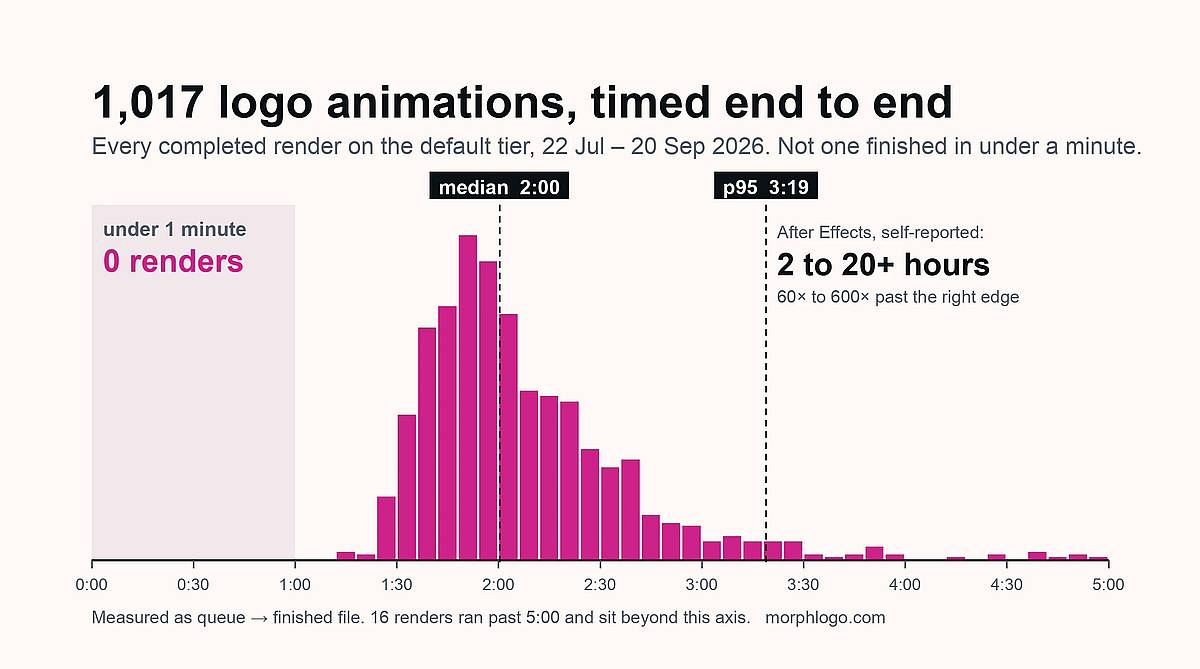
This half we can measure exactly, because every render is timestamped. The chart at the top of this page and the table below are the same data: 1,017 completed generations on our default tier — every 4-second 480p job between 22 July and 20 September 2026, timed from the moment the render job is queued to the finished file being ready, excluding the upload itself.
| Time | |
|---|---|
| Fastest quarter | under 1 min 47 s |
| Median | 2 min 00 s |
| Slowest quarter | over 2 min 21 s |
| 95th percentile | 3 min 19 s |
| Finished in under a minute | 0 of 1,017 |
Just under half of all jobs land inside two minutes and 93% inside three. Higher settings cost time rather than saving it: the 1080p tier ran a median of 4 min 30 s, though on only nine jobs, so read that one as indicative.
That last row is in the table deliberately. "In about a minute" is the phrase this entire category reaches for, ours included, and on our own numbers it has not happened once.
Why the two numbers are 60 times apart
Because the hours in After Effects are not rendering time. Rendering a short logo animation is fast on any modern machine; one of the self-reports above puts a six-second export at up to twelve minutes, inside a thirty-minute job. The hours go somewhere else:
| Where the time goes | After Effects | AI tool |
|---|---|---|
| Preparing the artwork | Redraw or relayer the logo as vectors | Upload the file you have |
| Deciding the motion | Design it: entrance, timing, easing, exit | Pick from a fixed set of styles |
| Building it | Keyframes, masks, pre-comps, expressions | None |
| Revising it | Each round is more of the above | Regenerate, seconds of input |
| Rendering and exporting | Render queue or Media Encoder | Included in the two minutes |
The trade sits in the second row. After Effects charges you for the deciding, and gives you an animation that exists nowhere else. A generator skips the deciding, and gives you one of a known set. If the motion itself is the product — a title sequence, a brand film, a client deliverable with revisions — you want the deciding, and the hours are the job, not the overhead.
Which route fits your deadline
The deadline decides this more than the logo does. Inside a day and without After Effects skills, a generator is the only route that finishes at all; anything custom with revisions is a working day to a working week, whoever builds it.
| You need it | Realistic option |
|---|---|
| In the next ten minutes | A generator. Nothing else on this page finishes in ten minutes. |
| Today, and you already know After Effects | After Effects, for something simple. The self-reports put a simple build at one to two hours. |
| Today, and you do not know After Effects | A generator, or a freelancer. Learning starts at about two weeks. |
| This week, custom, with revisions | A freelancer or studio. Budget the working day to working week the threads describe. |
| Repeatedly, as part of your job | Learn After Effects. The 80 to 150 hours amortise fast. |
If the deadline question is really a budget question, what a logo animation costs puts the same three routes side by side in money, with 40 freelance gigs priced on the same week. And if you have decided against After Effects but are not sure what replaces it, which free After Effects alternative fits your file sorts the options by what your logo currently is.
Frequently Asked Questions
How many hours does a logo animation take in After Effects?
Working motion designers self-report one to two hours for a simple build they have done before, around 8 hours for a couple of minutes of finished animation, and 20 to 30+ hours for something custom with revisions. None of those figures include learning the software, which the same communities put at about two weeks for basics and 80 to 150 hours to reach a skilled level.
How long should a logo animation be?
Most logo animations run 2 to 5 seconds, per Vistaprint's guide, with the shorter end suiting social posts and the longer end suiting video intros; guides aimed at longer intros push the top of that range to about 7 seconds. That is a different question from how long it takes to make. The length of the clip and the length of the build are unrelated — a two-second animation can take a week to design.
How long do 2 minutes of animation take?
One motion designer in r/AfterEffects reports 8 hours for two minutes of finished animation, and describes another project at 5 days for 30 seconds. Studio Pigeon puts a fully produced 60 to 90 second animation at 8 to 10 weeks. The spread is real: duration is a weak predictor of effort, and complexity is a strong one.
Can a logo animation be done in under a minute?
No — not in 1,017 measured renders. Across every completed job on our default tier, zero finished in under 60 seconds, and the median was 2 minutes 0 seconds. Treat any "in seconds" claim, including the ones this category makes about itself, as marketing until someone shows the distribution.
How long does a logo take to make?
Designing a logo and animating one are separate projects, and everything on this page measures only the second. The one-to-twenty-hour range above assumes the mark already exists as a file you own; if it does not, the design brief comes first and runs on its own clock. None of the threads cited here measure that half.
How do I animate a logo in After Effects?
Import the logo as layered vector artwork, convert the vector layer to shapes with Layer → Create → Create Shapes from Vector Layer, split the mark into the elements you want to move separately, keyframe each element's position, scale, opacity or trim paths, adjust the easing until the motion feels intentional, then render through the render queue or Media Encoder. The steps are quick to list and slow to do well, which is the whole reason this page exists.
Start from what you actually need
If you need an animation you designed, budget a day of your own time or a week of someone else's, and use After Effects. Nothing here replaces it for that.
If you need your existing logo to move, once, at the top of something, the honest number is two minutes and a short list of choices. Upload the file you already have and see what comes back.
Turn the logo you already have into a finished animation, in about two minutes. MorphLogo works from your existing file — PNG, JPG or vector — and exports MP4, GIF, WebP and WebM. Start animating free →
One free generation, no credit card. Paid plans start at $9.90 one-time, not a subscription.
Table of Contents
Author

Categories
Tags
More Posts
6 Best Higgsfield Alternatives in 2026, Tested for Logo Fidelity
Higgsfield is a multi-model gateway built for cinematic shots, which is why logos come back altered. Six alternatives compared, with measured first-to-final frame drift for six style presets.
What Logo Animation Costs: Freelancer, Agency or Self-Serve
What a logo animation costs from a freelancer, a studio or a self-serve tool, broken down by deliverable: 40 Fiverr gigs priced on 2026-09-20, the real cost of every add-on, and published studio and day rates.

A Free After Effects Alternative for Logo Animation
The right After Effects alternative depends on the file you already have. Most guides assume vector artwork and a Lottie file; here is what to do when your logo is a PNG and you need an MP4 — every price checked against the vendor's own pricing page.