6 Best Higgsfield Alternatives in 2026, Tested for Logo Fidelity
The strongest Higgsfield alternatives for logo animation are MorphLogo, Runway, Kling AI, Pika, Luma Dream Machine and OpenArt. Which one fits depends on a question none of the other comparison posts ask: does your logo come back unchanged? Higgsfield is a multi-model gateway tuned for cinematic shots, so it treats a brand mark as repaintable content.
That distinction is the whole article. Below are six alternatives, a measurement of what actually happens to a logo during an AI render, and an honest list of the jobs we cannot do.
If you want a general-purpose Higgsfield replacement for any kind of video, go straight to the comparison table below: Runway for shot-level control, Kling for realistic motion, Luma for camera moves. If the thing you are animating is a brand mark, the rest of this page is about the one question those tools do not answer.
Animate your own logo and check the final frame yourself. Try the logo animation AI free → Upload a PNG, pick a style, then compare frame one with the last frame. That comparison is the entire test.
Why people look for a Higgsfield alternative
Most people arrive at this search because of billing structure, not output quality. Higgsfield sells subscriptions that carry credits, and those credits are consumed per generation. Three documented terms drive the frustration, all of them published by Higgsfield itself:
- Refunds run on a seven-day, all-or-nothing rule. Their Terms of Use Agreement states you may request a refund "within seven (7) days of your initial purchase … provided no Credits … have been used," and that refunds "apply only to initial purchases, not renewals," subject to a service fee of up to six percent.
- Partial use voids the refund entirely. Their help center puts it plainly: "Refund eligibility is binary: if any credits have been used, a refund can't be issued, regardless of how many credits remain." Free and Unlimited-model generations are excluded from that count, so they do not affect eligibility.
- Subscription credits reset and do not roll over. Higgsfield's own credits documentation states they reset "on monthly plans with each paid renewal, on annual plans every 30 days". Separately purchased Credit Packs and promo credits are not affected by that reset.
None of that is hidden, and none of it is unusual for AI video pricing. It becomes a problem for one specific buyer: someone who needs a logo animated a handful of times a year and is being asked to carry a recurring subscription plus a metered balance to do it.
If you generate video weekly, the subscription math works. If you need three clips for a product launch and nothing until next quarter, it does not.
What Higgsfield actually is: a gateway, not a model
Higgsfield is best understood as an aggregation layer over other companies' video models, wrapped in camera-motion presets and a polished interface. A widely upvoted comment in the r/generativeAI thread ranking first for this query describes it as "essentially an aggregator with a shiny UI, neat camera presets, and multi-model access." Hedra, ranking fourth, characterises it the same way from a competitor's vantage point: "a model gateway with cinematic presets."
Higgsfield resells the same families of video models that every other tool in this space draws on. So the honest claim is not that our model is better — the underlying models are broadly comparable. The difference is what surrounds it: a pipeline that constrains the model to leave the artwork alone, a style catalogue where the presets were selected for mark integrity, and an export step built for the places logos actually get used.
Buying access to eleven video models is the right move when you don't know what you will shoot next week. It is the wrong move when you know exactly what you need and the subject never changes.
The test every Higgsfield alternatives list skips
Generic AI video models treat every pixel as content they are allowed to repaint. That is exactly what you want for a landscape and exactly what you do not want for a trademark.
We measured it. On 22 September 2026 we took 89 renders from our current engine (61 that MorphLogo users made with a style and no typed description, plus 28 of our own test logos), extracted the first and final frame of each, and computed the mean absolute difference across all RGB channels on a 0–255 scale. A low number means the mark returns to its starting state and the clip loops cleanly. A high number means the scene changed along the way.
Updated 22 September 2026: the first version of this table measured preview clips from an older pipeline that locked the last frame to the logo, which flattered every style. The numbers below come from the engine you actually get.
| Style preset | Renders measured | Median first-to-final drift (0–255) | What you see |
|---|---|---|---|
| Orbit 3D | 19 | 1.77 | Camera moves, mark holds; 12 of 19 loop with no visible seam |
| Gold Shimmer | 7 | 3.04 | Mixed: 4 of 7 loop clean |
| Spin 360 | 19 | 3.15 | Usually a faint jump at the restart; 4 of 19 clean |
| Neon Pulse | 3 | 1.62 | Mixed: 2 of 3 loop clean |
| Hologram | 3 | 8.69 | Opens with the glow already on the mark and ends without it |
| Cinematic Reveal | 11 | 34.52 | Opens in shadow and ends in full light; flashes every time |
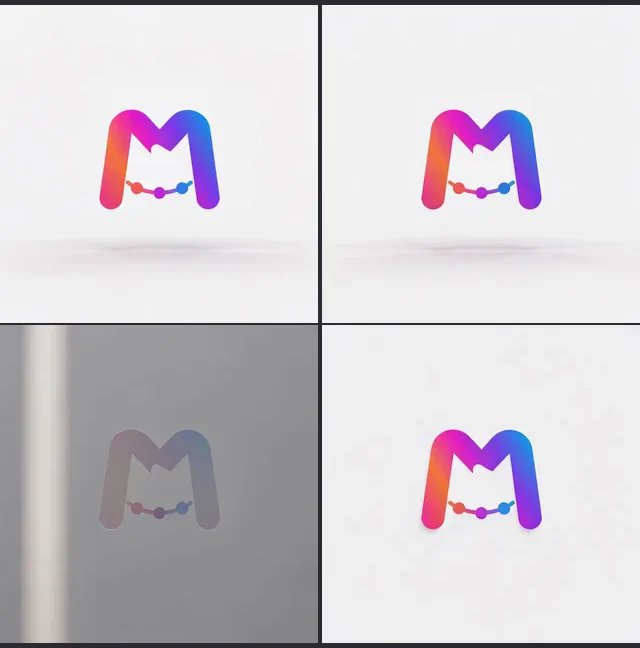
Orbit 3D drifts 1.3/255 and returns to its opening frame. Cinematic Reveal drifts 83: it opens in shadow and ends in full light.
Several of our own presets fail this test, and we are leaving them in the table because the failure is the point. Cinematic Reveal relights the whole scene and Hologram starts with its effect already on the mark, and that is where a diffusion model starts making decisions about your frame. If you need a seamless loop for a website header, start with Orbit 3D; every style is measured the same way on our looping logo animation page.
The legal standard for when a redrawn mark stops being the same mark is stricter than most people assume. The USPTO applies an "essentially the same commercial impression" test when deciding whether an amended mark is a material alteration of the original. That rule governs registration paperwork rather than marketing video, but it is a useful yardstick: a render that resizes your mark and adds a shadow has changed the impression, whatever the prompt asked for.
You can see the same comparison across every preset on our logo animation examples page, where each clip plays against the static original.
The 6 best Higgsfield alternatives for logo animation
1. MorphLogo — for animating a logo you already have
Upload a static PNG, JPG, WebP or SVG and get a four-to-ten second animated version in about two minutes. Exports cover MP4, GIF, an email-signature-sized GIF, WebP and WebM, up to 720p on Standard and up to 4K on Studio. Pricing is one-time credit packs, with an optional monthly plan. The scope is deliberately narrow: it animates finished logos and does nothing else.
Best when you have a final logo and need it moving for an intro, a site header or a signature.
2. Runway — for directors who need shot-level control
The most capable general-purpose option here, with motion brushes, camera controls and a proper editing timeline. Runway is a subscription with credits, and its strength is sequences, not single assets. Use it when the logo is one shot inside a larger edit.
3. Kling AI — for realistic motion
Strong image-to-video with convincing physical movement, and one of the models Higgsfield resells. Going direct removes the middle layer. Like Higgsfield, it will happily reinterpret your artwork, so check the final frame.
4. Pika — for fast social clips
Quick turnarounds and a library of effects aimed at short-form social video. Good for experimenting cheaply; less suited to a mark that must stay exact.
5. Luma Dream Machine — for camera movement
Notable for natural camera moves and scene coherence. The same caution applies: it is a general video model, and your logo is just content to it.
6. OpenArt — for image and video in one place
The all-in-one alternative Google itself pairs with Higgsfield in its People Also Ask box. Broad toolkit spanning image generation, editing and video, which makes it a reasonable Higgsfield substitute and an imprecise logo tool.
One category we cannot serve: if you landed here wanting expressive talking-head or character animation, the top-ranked Reddit thread recommends Hedra and LivePortrait, and that advice is correct. Those are face and avatar tools. We do not compete there.
Higgsfield alternatives compared side by side
Here is how the six Higgsfield alternatives line up on the two axes that decide a logo job: what the tool is built for, and how it bills you.
| Tool | Built for | Treats the logo as | Pricing model |
|---|---|---|---|
| MorphLogo | Animating an existing logo | Fixed artwork | One-time, plus optional monthly |
| Higgsfield | Cinematic shots via many models | Repaintable content | Subscription + credits |
| Runway | Full video production | Repaintable content | Subscription + credits |
| Kling AI | Realistic image-to-video | Repaintable content | Subscription + credits |
| Pika | Short social video | Repaintable content | Subscription + credits |
| Luma Dream Machine | Camera-driven scenes | Repaintable content | Subscription + credits |
| OpenArt | Image and video suite | Repaintable content | Subscription + credits |
Published prices for these tools change often, so check each vendor's current page rather than trusting a number in any comparison post, including this one.
What MorphLogo cannot do
A narrow tool is only worth choosing if you know where the edges are.
- Transparent background only as a paid option with conditions: it needs a logo on a transparent background, works with four styles or your own description, drops glow effects, and MP4 keeps the green screen
- No Lottie and no animated SVG
- No animated text or kinetic typography
- No control over rotation speed or axis
- No Blender, Cinema 4D or After Effects project files
- No photo or talking-head animation
- Free credits give a watermarked preview you can watch online; downloads in any format need a paid option
If you need a vector file a developer can drop into an app, or frame-level control over the motion, a motion designer with After Effects is still the right answer. Our tool-by-tool comparison of logo animation software covers those routes in detail.
Pricing: one-time versus subscription
The structural difference matters more than the headline number. Every general AI video tool in this list, Higgsfield included, charges a recurring fee that carries a credit balance which resets monthly. MorphLogo sells one-time credit packs that never expire: $9.90 for 400 credits, $29 for 1,800 or $79 for 6,000, with an optional $19 monthly plan (1,200 credits a month, unused credits roll over) for people who generate regularly. Full details are on the pricing page.
Treat any Higgsfield price you read with suspicion, this article included. Among the pages ranking for this search right now, one lists an entry tier at $9, another at $15 and a third at $19, while a fourth gives up and writes "variable plans." They were captured at different moments and mostly undated. Structure is the durable part of a pricing comparison; the numbers are not.
For an occasional buyer, the comparison is not price per clip. It is whether you are still paying in March for a logo you animated in January.
Free Higgsfield alternatives and open source options
Start with what Higgsfield's free option actually is, because it is not a free tier. Its help center defines free generations as "a one-time pool granted when you purchase the plan" that "do not renew upon your subscription renewal." That is a bonus sitting inside a paid plan, not a way in front of it.
For a genuinely free route, open source video models with published weights run on your own hardware: Stable Video Diffusion, Wan and LTX-Video, typically driven through ComfyUI, with AnimateDiff workflows still popular for stylised motion. This is the answer to the GitHub question in Google's PAA box, and it is real — but the cost moves rather than disappears. You need a capable GPU, several hours to assemble a working pipeline, and the same fidelity problem remains, now without a preset that was tuned to avoid it.
Our free sign-up credits render a watermarked preview you can watch online, which is enough to run the final-frame test on your own artwork before paying anything.
FAQ
Can Higgsfield animate logos?
Yes. It accepts a static image and animates it, and Higgsfield logo animation is a common enough use that the platform publishes motion presets aimed at it. Because it routes to general video models, expect the mark to shift on presets that relight the scene, and check the final frame against your original.
Is Higgsfield better than OpenArt?
They solve different problems. Higgsfield concentrates on cinematic video presets across multiple models; OpenArt is a broader suite covering image generation, editing and video. For logo work specifically, neither is built around keeping a mark intact.
Can I use Higgsfield for free?
Not in the way the question implies. Higgsfield's help center describes free generations as a one-time pool granted when you buy a plan, and states they do not renew when the subscription renews. They lower the cost of a paid plan rather than replacing it. Tiers change often, so confirm current terms on their pricing page.
Is there a free alternative to Higgsfield AI available on GitHub?
Yes. Open-weight models including Stable Video Diffusion, Wan and LTX-Video can be run locally, usually through ComfyUI. They cost nothing to license but require a capable GPU and setup time.
What is the best free Higgsfield alternative?
No hosted tool is free without limits. The genuinely free Higgsfield alternative is an open source model run on your own GPU: Stable Video Diffusion, Wan or LTX-Video through ComfyUI. Our free sign-up credits render a watermarked preview you can watch online, which is enough to run the final-frame test on your own artwork.
What is the best unrestricted AI video generator?
"Unrestricted" usually means self-hosted, since any hosted service applies content policies. Running an open-weight model locally gives the fewest restrictions. For commercial brand work, the constraint that matters more is fidelity to your artwork, not content filtering.
How long should a logo animation be?
Keep it short. Four to six seconds covers an intro or a signature loop. The W3C's WCAG success criterion 2.2.2 Pause, Stop, Hide requires a pause mechanism for automatic movement that runs beyond five seconds alongside other content, which is a good reason to keep a looping header brief.
Which Higgsfield alternative to pick
The right Higgsfield AI alternative depends on what you are animating, not on which tool ships the longest model list.
Pick MorphLogo if you have a finished logo, want it moving this afternoon, and do not want a recurring bill. Pick Runway if the logo is one shot in a larger edit. Pick Kling, Pika or Luma if you want a general video model and are comfortable checking output frame by frame. Pick an open-weight model if you have the GPU and the patience.
And whichever you choose, run the same test we ran: generate the clip, look at the first frame and the last frame, and decide whether that is still your logo. If you want a spinning treatment specifically, our 3D logo animation page covers the presets that scored best on that test.
Table of Contents
Author
Categories
Tags
More Posts
Animated Email Signature: How to Add a GIF That Plays in Outlook and Gmail
An animated email signature is a GIF placed in your signature like any other image. How to add one in Outlook, Gmail and Apple Mail, what Outlook 2007–2019 shows instead of the animation, and how big the file should be, with first frames and file sizes from our own renders.
What Logo Animation Costs: Freelancer, Agency or Self-Serve
What a logo animation costs from a freelancer, a studio or a self-serve tool, broken down by deliverable: 40 Fiverr gigs priced on 2026-09-20, the real cost of every add-on, and published studio and day rates.
How Long Does It Take to Animate a Logo? Both Routes, Timed
Nobody answers this with a number. Here are both clocks: what working motion designers self-report for an After Effects build, and the full distribution of 1,017 measured AI renders — median 2 minutes, none under one.