Animated Logo File Formats: MP4, GIF, WebM or Lottie?
The best animated logo file format depends on where it plays: MP4 for video, WebM with an MP4 fallback for websites, GIF for email signatures, and GIF or animated WebP for chat apps and image-only uploads. Choose Lottie or animated SVG only when the logo must stay vector inside an app.
Animated logo file formats come in three families. Video formats (MP4, WebM, MOV) need a player. Animated images (GIF, animated WebP, APNG) play anywhere an image can. Vector formats (Lottie, animated SVG) store shapes instead of pixels, so they stay sharp at any size.
We exported 21 four-second logo renders to all five animated logo file formats in MorphLogo's download menu and weighed every file; the GIF came out bigger than the MP4 master every time.
Have a logo but no animation yet? Render one and download it as MP4, WebM, WebP, GIF or email GIF. Try the logo animation AI →
Upload a PNG, JPG, WebP or SVG; most renders finish in a few minutes. A watermarked preview is free to generate; downloading any format needs a credit pack or plan.
Which file format is best for an animated logo?
The best animated logo file format is the one the destination plays without help. Video needs a player, email apps animate GIFs but not video, and some upload forms take only images. Match the file to the placement: most people end up with an MP4 for anything video and a GIF for email, plus a WebM if the logo goes on a website.
| Where the logo goes | Use | Why |
|---|---|---|
| Website hero or header | WebM, MP4 as fallback | Smaller than our MP4, WebP and GIF in all 21 tests |
| Email signature | Email-sized GIF | Gmail and Outlook 2007–2019 for Windows don't play video in email |
| Chat apps, forums, image-only uploads | GIF, or animated WebP where accepted | Autoplays and loops with no player |
| YouTube, social posts, ads, video editors | MP4 | The original render, with sound if you added it |
| Slide decks | MP4; GIF in Google Slides | Microsoft recommends H.264 MP4 for PowerPoint; Apple says H.264 plays on every Apple device; Slides takes GIFs as images |
| App UI, loaders, hover effects | Lottie or animated SVG | Stays vector and scriptable |
| LinkedIn Page logo | Static PNG or JPEG | LinkedIn Page images must be PNG or JPEG |
Which format goes into a video editor?
Use the MP4: it is the render itself, repackaged for fast playback but never re-compressed. H.264 is on Final Cut Pro's supported formats list; WebM is not. For a 16:9 intro, render at 16:9 (MorphLogo also does 4:3, 1:1, 3:4 and 9:16) instead of cropping a square.
MP4 vs GIF: which should you use for a logo?
Use MP4 wherever video plays and GIF only where it doesn't. In our tests the GIF was bigger than the MP4 master in 21 of 21 clips, while carrying a quarter of the pixels and 15 frames per second instead of 24.
How we measured. On 2026-09-19 we converted 21 four-second, 1:1 renders (960 × 960 px at 24 fps, the sample set behind our logo animation examples page) with the same export service and settings that build user downloads. Sizes are decimal: 1 KB is 1,000 bytes.
Here is what each download contains and how big it came out. The MP4 is the original render; the other four are converted from it at download time, trading pixels, frames or colors for a smaller or more compatible file.
| Format | Picture and frame rate | Colors | Looping |
|---|---|---|---|
| MP4 (H.264) | Render size (960 px here), 24 fps | Full color | If the player loops it |
| WebM (VP9) | Short side up to 1,080 px (960 px here), 24 fps | Full color | If the player loops it |
| Animated WebP | Short side up to 720 px, 24 fps | Full color | Forever |
| GIF | Longest side 480 px, 15 fps | Up to 256 per frame | Forever |
| Email GIF | Longest side 240 px, 10 fps | 64 | Plays once |
Only the MP4 and WebM carry sound, and only if you added it.
| Format | Median size | Range across 21 clips | Size vs. the MP4 (median) |
|---|---|---|---|
| MP4 | 2.00 MB | 1.36–2.94 MB | 1× |
| WebM | 496 KB | 55 KB–1.60 MB | 0.25× |
| Animated WebP | 984 KB | 416 KB–1.77 MB | 0.44× |
| GIF | 3.65 MB | 2.5–6.4 MB | 1.86× |
| Email GIF | 509 KB | 343–862 KB | 0.26× |
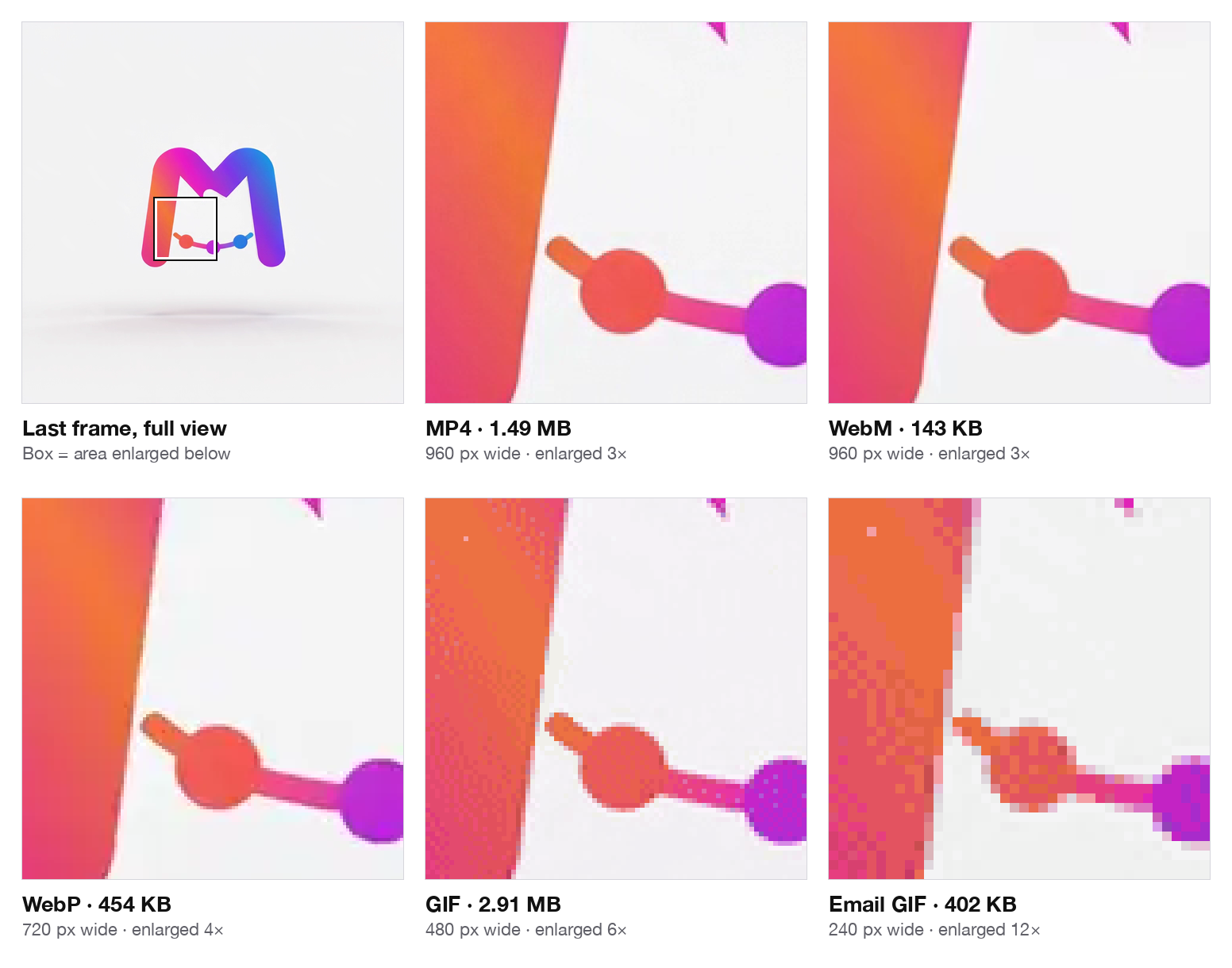
Same frame, same spot. MP4, WebM and WebP are hard to tell apart; the GIF sprinkles dither dots through the gradient, and the email GIF breaks into blocks when enlarged, though not at signature size.
Why is a GIF bigger than the video it came from?
A GIF can only skip pixels that stay exactly the same between frames, and rendered clips have fine grain in the backdrop, so nearly every pixel is rewritten every frame. The GIF89a specification also caps each frame at 256 colors, so gradients get faked with dither dots that compress badly. Video codecs store what changed, in full color.
Google's web.dev guide shows a wider gap, a 3.7 MB GIF against a 551 KB MP4, because it converts at the GIF's own size; our MP4 keeps twice the GIF's width, and the GIF still came out 1.2 to 2.6 times bigger.
GIF still wins in email and anywhere that takes images but not video; for those, the GIF logo maker builds both GIF sizes from one render.
Where does animated WebP fit?
Animated WebP sits between the two: full color and an endless loop without a player, at a bit under half the MP4's size. Current Chrome, Edge, Firefox and Safari display it (Can I use); Gmail turns it into a still JPEG (Can I email). Use it where a platform takes images but not video.
When do you need Lottie or animated SVG?
You need Lottie or animated SVG only when the logo has to stay vector: sharp at any size, controlled by code, or reacting to clicks and scrolling in a site or app.
Lottie is an open-source vector animation format created in 2015 by Hernan Torrisi to export After Effects animations; the file is JSON, traditionally exported with the Bodymovin plugin. An animated SVG is a Scalable Vector Graphics (SVG) file animated with CSS or SMIL. Both store shapes and keyframes, not pixels.
That is also their limit: both have to be built from vector artwork, such as an SVG or Illustrator file. In a rendered clip, particles, liquid metal and lens flares are just pixels, and a rendered video can't be turned back into the vector shapes Lottie animates.
MorphLogo doesn't export Lottie or animated SVG; it renders video. For vector motion, use a vector tool such as LottieFiles, Lottielab or SVGator, or After Effects with Bodymovin. For a hero banner, intro or post, video is simpler and shows effects vector formats aren't built for.
Can an animated logo have a transparent background?
Yes, if the format has an alpha channel, a transparency value for every pixel. Animated WebP, APNG, WebM with VP9 alpha, HEVC with alpha and MOV with ProRes 4444 have one; a GIF can only make a pixel fully clear or fully solid.
Transparency only helps if it survives playback where the logo lands: a WebM with alpha is transparent in Chrome but not in Safari, and a transparent GIF shows fringes on backgrounds it wasn't prepared for.
| Format | Transparency | Where it works |
|---|---|---|
| GIF | One color fully clear, the rest solid (GIF89a) | Everywhere, with halos or jagged edges |
| APNG | Full alpha | Current browsers; not Gmail on the web or Android |
| Animated WebP | Full alpha | Current browsers; Gmail turns it into a still JPEG |
| WebM (VP9 with alpha) | Full alpha | Chrome, Edge and Firefox; Safari ignores the alpha |
| HEVC with alpha | Full alpha | Safari on iOS 13 and macOS Catalina or later |
| MOV (ProRes 4444) | Full alpha, up to 16-bit | Video editors; about 330 Mbps at 1080p, too heavy to deliver |
| PNG sequence | Full alpha, one PNG per frame | Motion design and compositing apps (Apple Motion exports it); a folder of frames, not a web file |
So transparent video on a website takes two files: a VP9 WebM with alpha for most browsers and an HEVC-with-alpha file for Safari.
MorphLogo's transparent background is a paid option with conditions. It needs a logo file with a transparent background, works with 360° spin, Soft float, Bounce pop, Confetti pop or your own description, and loses glow effects around the logo. The clip is rendered on a green screen and keyed out when you download: WebM, animated WebP and MOV (ProRes 4444) keep soft alpha edges, the GIF is cut hard at full clear or full solid, and the MP4 keeps the green screen. There is no APNG, PNG sequence or editable project file. Every size measured on this page comes from opaque renders; transparent files were not part of the test.
With the option off, every export is opaque:
- Upload the logo on the background it will sit on. The render starts from the color in your file's corners; a transparent PNG gets a near-white studio tone, and pure white came back as #F9F9FC in our test.
- Pick a style that opens on your logo. Those keep the backdrop within a shade; reveal styles such as Particle assembly or Glitch burst can relight the scene.
- Over footage or changing backgrounds, turn on the transparent background if your style is one of the four above, or get a master from a motion design app that exports ProRes 4444, a PNG sequence or WebM with alpha, or a vector tool.
How big should an animated logo file be?
Keep an email signature GIF under 500 KB (some signature vendors say 200 KB) and a website clip as light as its motion allows. In our tests a four-second square logo came to 55 KB–1.60 MB as WebM and 343–862 KB as an email GIF.
For an email signature
Neither Gmail nor Outlook publishes a GIF size limit. For email GIFs in general, Litmus recommends 1 MB at the largest; for animated signature GIFs, the signature vendor WiseStamp says to stay under 500 KB, and Letsignit suggests 200 KB at most. Our email GIF (240 px, 10 fps, 64 colors, plays once) came to 384–402 KB for styles that open on the logo: inside WiseStamp's limit, not Letsignit's. Every file over 500 KB was full-frame motion such as particles or shatter, and none of the 21 got under 200 KB.
Display size decides legibility, not format. Gmail shows signature images at most 100 px tall, and at that height the two-line tagline in our test logo is one or two pixels high in any format, while the icon stays visible:
| Element | In the 960 px MP4 | In a signature 100 px tall |
|---|---|---|
| Diamond icon | 158 px | about 16 px |
| VERTEX wordmark | 58 px | about 6 px |
| PRECISION TOOLING CO. | 20 px | about 2 px |
| EST. 1998 · SINCE THEN | 12 px | about 1 px |
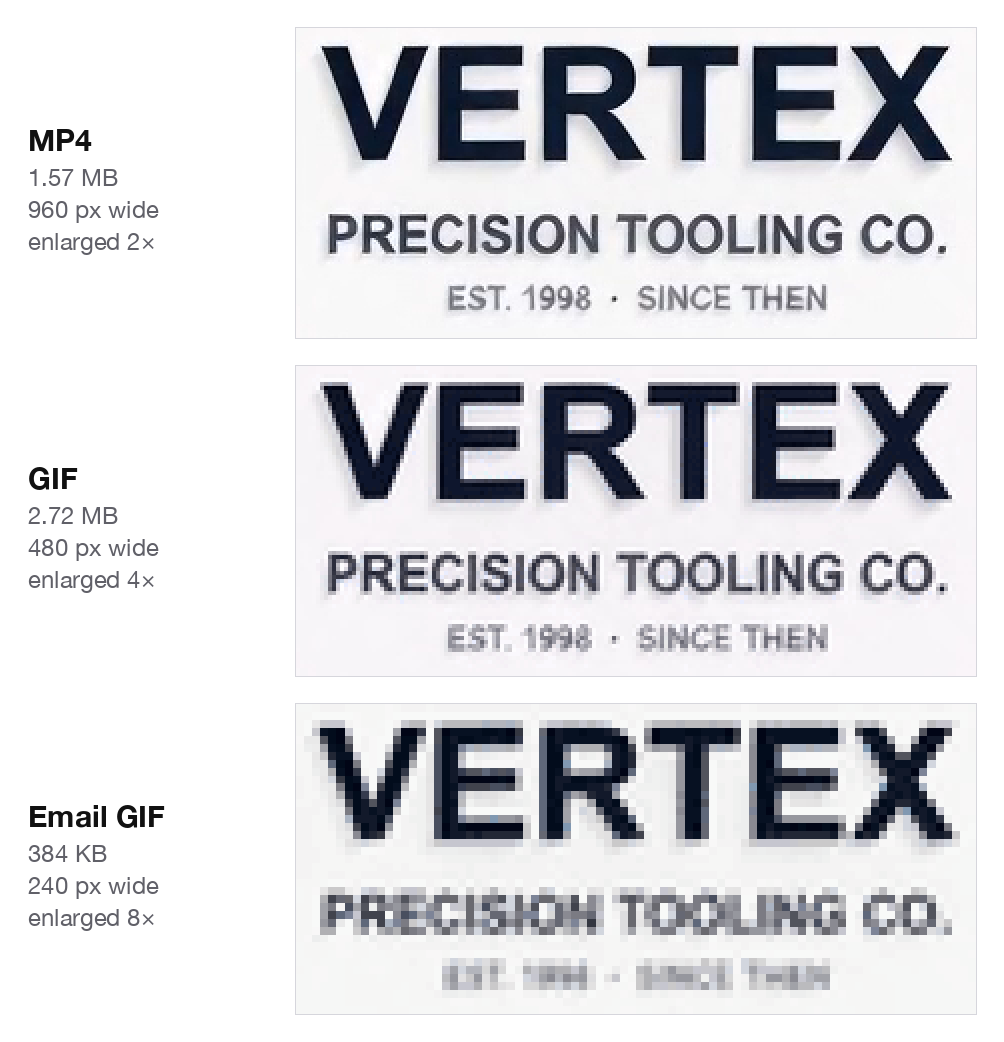
Keep the signature version to the icon or wordmark and put the tagline in text. Outlook for Windows 2007–2019 shows only the first frame, so pick a style that opens on your logo; setup steps are in our animated email signature guide.
For a website
On a web page, file size is load time, and the motion decides most of it. Styles that keep the logo whole change little per frame: their WebM came to 111–143 KB, and sketch reveals to 87 KB at the median. Full-frame motion such as particles or liquid changes nearly everything and reached 615 KB at the median, up to 1.60 MB. Longer clips grow with every second. A 1080p or 4K render enlarges the MP4 and WebM, while the WebP stays capped at 720 px and the GIFs at 480 and 240 px.
How do you put an animated logo on your website?
Put it in a muted, looping HTML <video> element, list the WebM first with the MP4 as fallback, and use your original logo file as the poster image.
<video autoplay muted loop playsinline
       poster="/images/logo.png" width="480" height="480">
  <source src="/media/logo-animation.webm" type="video/webm">
  <source src="/media/logo-animation.mp4" type="video/mp4">
</video>
Each attribute has a job; leave one out and the logo can freeze, go fullscreen or load the bigger file.
mutedwithautoplay: Chrome always allows muted autoplay, and WebKit lets muted video autoplay on iOS.playsinline: keeps iPhone playback inside the page instead of fullscreen.loop: returns to the start at the end (MDN).- WebM first: an MP4 listed first would win even where the smaller WebM works.
poster: shows until the video loads. Use your logo file: styles that open on your logo start on it, and every style is guided to land on it at the end.
Don't use a GIF for the hero. Ours were 8 times the WebM at the median, with fewer colors and frames.
Two checks before it ships:
- Add a pause control to a loop. WCAG 2.2 success criterion 2.2.2 requires a way to pause moving content that starts automatically, lasts more than five seconds and sits beside other content. A looping four-second clip qualifies: add a pause button or
controls, or droploop. - Watch the loop point. Measured on 89 current renders, 3D orbit closed the loop cleanly in 12 of 19, 360° spin usually left a faint jump, and Cinematic reveal flashed every time because it ends brighter than it began. The looping logo animation page has the table for every style.
Animated logo file format FAQ
Do SVG files support animation?
Yes. SVG shapes can be animated with CSS or SMIL elements such as <animate>, and browsers play them without a video player. The motion has to be built on the vector shapes; a rendered video can't be turned back into vector shapes.
What is a .lottie file?
A .lottie file is a dotLottie file: a compressed archive that packages one or more Lottie animations with their assets. The animation inside is still Lottie JSON, with extras such as themes and state machines for interactive motion.
Can PNG be used for animation?
Yes, as APNG (Animated PNG). It works like an animated GIF but supports 24-bit color and full alpha transparency, and current versions of Chrome, Edge, Firefox and Safari play it. Where APNG isn't supported, only the first frame shows, and Gmail on the web and on Android doesn't support it.
Should a logo be PNG or JPG?
PNG, for a logo that sits on different backgrounds: it compresses without loss and supports transparency, and JPEG has no alpha channel. For print and resizing, keep the vector original: SVG, EPS or PDF. MorphLogo takes PNG, JPG, WebP or SVG; for a transparent clip, upload a logo with a transparent background, otherwise upload it on your final background color.
Table of Contents
Author

Categories
Tags
More Posts
Every Way to Animate a Logo: A Tool-by-Tool Comparison
Eleven realistic ways to animate a logo, each answering the same four questions — learning curve, ceiling, export formats, and when not to open it — plus a table that routes you from the file you already have to the right tool.
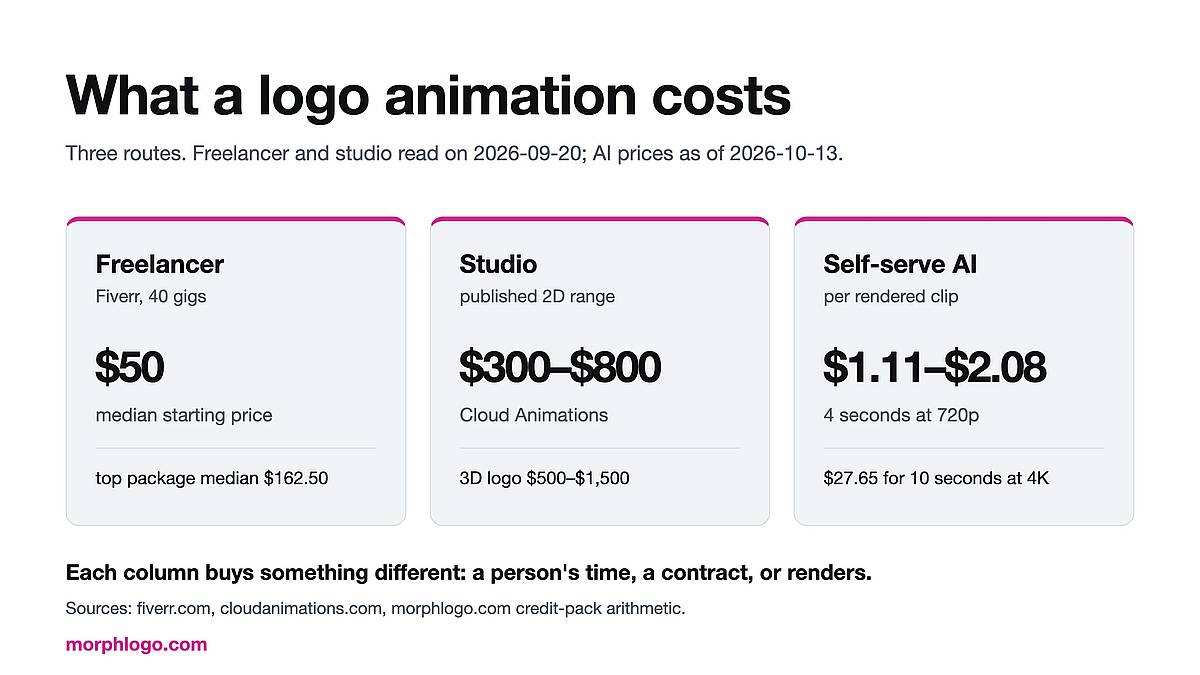
What Logo Animation Costs: Freelancer, Agency or Self-Serve
What a logo animation costs from a freelancer, a studio or a self-serve tool, broken down by deliverable: 40 Fiverr gigs priced on 2026-09-20, the real cost of every add-on, and published studio and day rates.

A Free After Effects Alternative for Logo Animation
The right After Effects alternative depends on the file you already have. Most guides assume vector artwork and a Lottie file; here is what to do when your logo is a PNG and you need an MP4 — every price checked against the vendor's own pricing page.